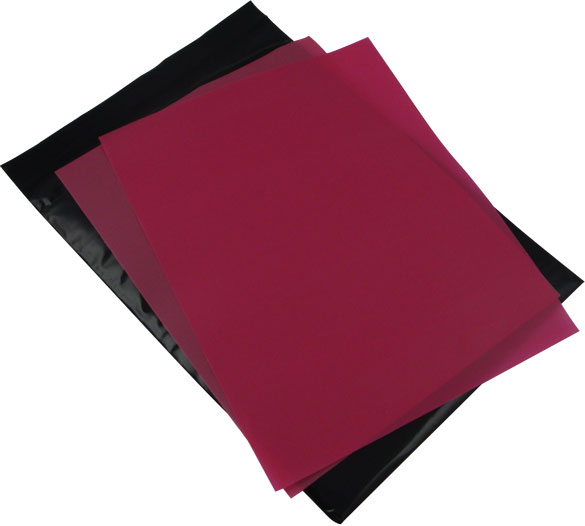

StencilPro™ Standard Film - 90Mesh
Product Code: EZI-STD-2, EZI-STD-5, EZI-STD-10, EZI-STD-XL1 & EZI-STD-XL5
StencilPro™ films expose in sunlight or inside under fluro lamps, washing out in water - faster and easier than Speedball, Diazo and traditional photo emulsions which use chemical emulsions.
Standard (90 Mesh) is for all general fabrics applcations, with designs also available onto ceramics, plastics, metals, glass with coarser edges and lower quality than using HiRes 200Mesh.
StencilPro™ replaces RISO Print Lamps
StencilPro™ replaces Print Lamps for screen exposure - no more wasting lamps and no special imaging machine is require, plus is you have a RISO system you can use all your existing frames, squeegee's and inks with StencilPro™ films
For customers using a Print Lamp system (Lamps are still available) , all you need StencilPro™ film, sunlight and water to begin. Of course an Exposure frame, Opaque Storage Container and Timer are helpful tools to achieve sharper results.
With the great versatility and strength of StencilPro™ films, you can use waterbased fabric inks, block printing inks, acrylics for paper, glass etching creams and low solvent inks for metals and plastics. StencilPro™ can be cleaned with water and weak solvents for storage.
Available Products
- Usage
- Contents/ Technical
- Support/ FAQ's

Key Features
No extra exposure equipment - use sunlight or inside under a fluroescent lamp.
No coating emulsions - no mixing sensitizer, emulsions or chemicals then waiting to dry
Develop in water with fast exposure times (under 1 min in sunlight).
Use your existing RISO & NEHOC frames, squeegee's and inks
Usage
Create Artwork
Print your design using ink jet, laser printer, photocopy, hand draw with texta or market pens - anything as long as it's opaque.
Place artwork face down
Artwork goes face down against the shinny side of the film.
Expose in light
A tight bond is required between the artwork and film, use Exposure Frame for best results.
Place in sun, time according to timetable given in StencilPro™ instructions.
Soak and rinse in water
Place imaged screen into water to soak - keep away from bright light during this time. Then brush out emulsion. Re-expose to harden film before use.
Ready to print
Your design is now ready to print. For screen printing mount to a plastic frame, for stenciling/ brushing/ spraying attach using tape.
Cleaning
You should never let ink or paint dry in your screen, as this is very hard to clean without damage.
Avoid ink drying in the screen by either:
a) Cleaning the screen (water or solvent cleaners depending on your ink type) when you pause printing
b) Perform a clearing print (see website) to remove ink from design area between each print
If several StencilPro™ films become stuck together do not pull them apart, soak in water for a few minutes until they come apart naturally.
Storage
Properly stored StencilPro™ has a shelf life of at least 18 months. Always store undeveloped film in the black bag, in the dark and away from heat/fluroescent light/ direct sunlight. We recommend storing undeveloped film inside the Opaque Storage Container for added protection against UV light.
Ideal storage/ usage temperature is between 5 to 25° Celsius. For hot/humid areas store inside Opaque Storage Container and place in refrigerator or cool room.
Store developed film flat, do not fold or bend.
Once developed the screen is no longer sensitive to light and may be stored in clear plastic bag or any suitable storage container.
Contents
See individual product specifications.
Specifications
Notice
CAUTION - THIS PRODUCT IS A LIGHT SENSITIVE MATERIAL
Open protective black bag under subdued lighting conditions only. Do not expose undeveloped film to U.V. or direct sunlight at any time. Avoid exposure to bright artificial light sources, especially from fluroescent tubes as this will begin to expose the StencilPro™ film. Protect from excessive heat, freezing and high humidity.
StencilPro™ film should be stored in an Opaque Storage Container away from heat and light sources.
Ask a Question
Complete the Product Assistance Form for a quick reply to any question not answered in the FAQ's or training section - click here . .
Important:
Use the product code listed at the top of this page.
FAQ's
There are no FAQ's for this product.